
Online Rent Collection Software: A Practical Rollout Guide
A practical rollout guide for online rent collection, from opening balances and payment review to reminders, arrears and month-end reports. Includes a PKR partial-payment example.
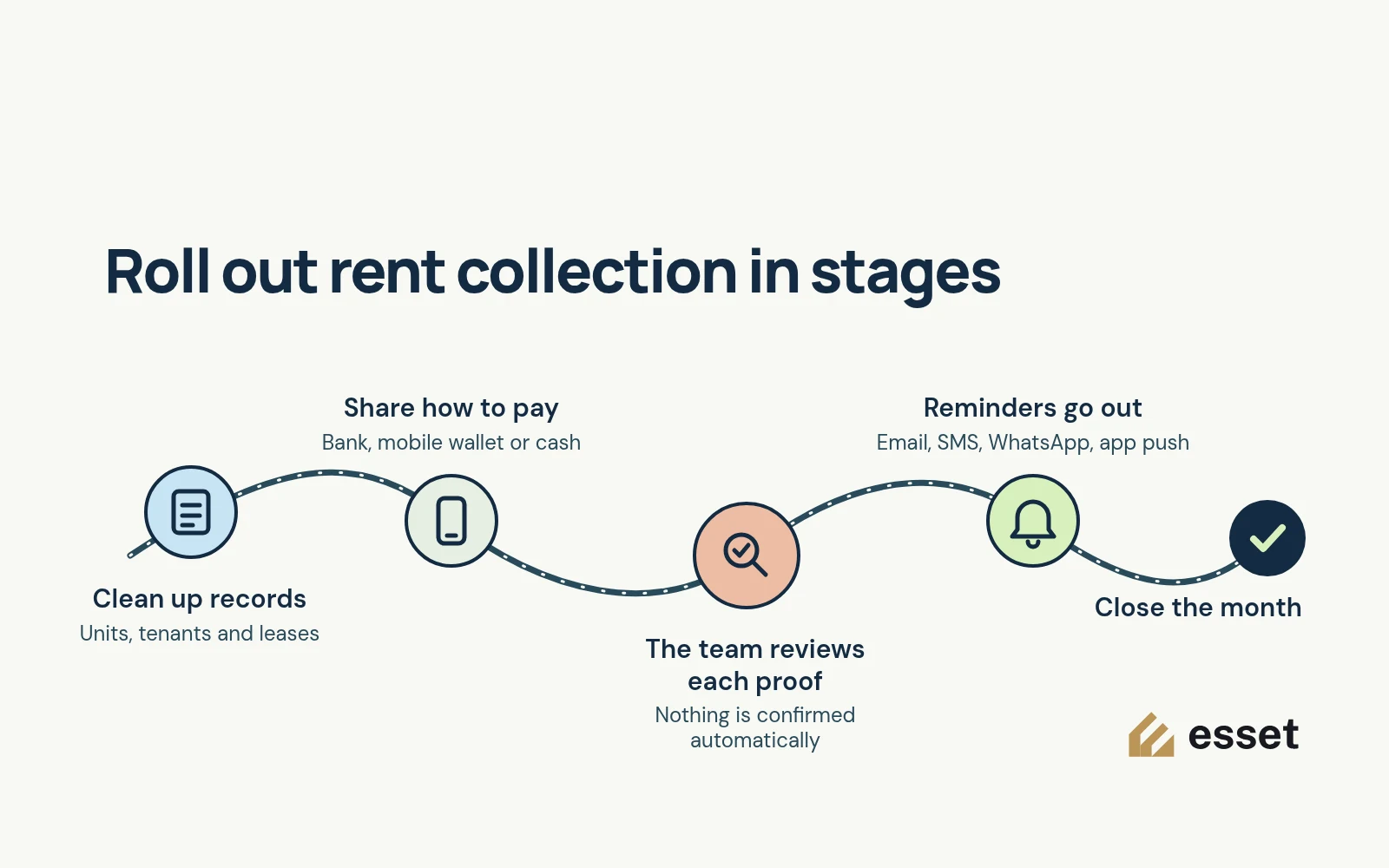
Online rent collection software connects tenant records, rent charges, payment reports, reminders and arrears in one workflow. A reliable rollout starts with checked tenant balances and a clear process for reviewing payments. This guide explains how to set up that process and reduce repeated calls and payment checks.
This guide is a practical rollout plan for landlords, property managers, hostel operators and developers with rental stock. It covers what to set up first, how to handle payment proof, how to run reminders without annoying good tenants, how to track arrears, and how to close the month with a rent roll and statements you can trust. If you are still choosing a product, start with our checklist of what landlord software should track first.
What online rent collection actually involves
Online rent collection is not only a payment button. It is a chain of records that has to agree from start to finish:
- The charge. What the tenant owes, for which unit and which period.
- The payment. What was received, when, how, and with what reference.
- The check. Who confirmed the money actually arrived in your account.
- The balance. What is still outstanding, and how old it is.
- The report. What the owner, the accountant or the tax return needs to see.
Most collection problems come from a break in that chain. The proof sits in a chat, the ledger sits in a spreadsheet, and the owner report is rebuilt by hand at month end. Good rent collection software keeps all five links in one record so nobody has to reconcile the same information twice.
Step 1: Clean your tenant and lease records first
Visibility comes before automation. Before you invite a single tenant to pay online, make sure every active tenancy has:
- Tenant name and contact details
- Property and unit
- Rent amount, billing frequency and due date
- Lease start and end dates
- Deposit held
- Opening balance, with supporting records for outstanding rent, credits and deposits
Reconcile each opening balance against the existing ledger, receipts and bank records before you go live, and resolve disputed amounts with the tenant. Keep historical records available for audit and queries. A wrong opening balance will affect later reminders and statements.
If you are coming from a spreadsheet, our guide to moving from spreadsheets to property management software covers the migration order. In Esset, tenants, leases and units each have their own record (how to add and manage tenants), and the team can help move data from a register or spreadsheet (Esset FAQ).
Step 2: Define the rent cycle and the statuses you will use
Every rent cycle should carry the same fields: due date, expected amount, amount received, payment reference or proof, verification status and follow-up notes. Then agree, as a team, on a short list of statuses and what each one means:
| Status | Meaning | Reminders? |
|---|---|---|
| Upcoming | Charge created, not yet due | Pre-due reminder only |
| Reported | Tenant says they paid and attached proof | Pause the disputed amount during a prompt review |
| Partially paid | Some money confirmed, balance remains | Yes, for the balance |
| Paid | Money confirmed in your account | Stop |
| Overdue | Past due date, nothing confirmed | Yes, follow-up sequence |
The key distinction is reported versus paid. A screenshot is a claim. It becomes a payment only when someone checks it against the bank or wallet statement. Keeping “reported” separate from “paid” stops two common problems: chasing a tenant who has already paid, and reporting rent to an owner that has not actually arrived.
Automated invoicing helps here because charges are created on schedule rather than typed in each month. In Esset, automated invoicing is part of every plan, alongside tenant charges, credits, refunds and deposits (Esset Pricing & Plans).
Step 3: Choose payment channels and a proof review routine
Decide which channels you accept (bank transfer, card, wallet, cash at the office) and write down, for each one, where the proof comes from and who checks it. Then set a review rhythm, for example every working morning, so reported payments do not sit unchecked for days.
In Esset, tenants report a payment and attach proof in the tenant app; the team reviews the details and confirms or rejects it. A reported payment does not change the balance until it is confirmed, and confirmation is never automatic (Esset payment reports). That design is deliberate: the ledger only moves when a person has checked the money.
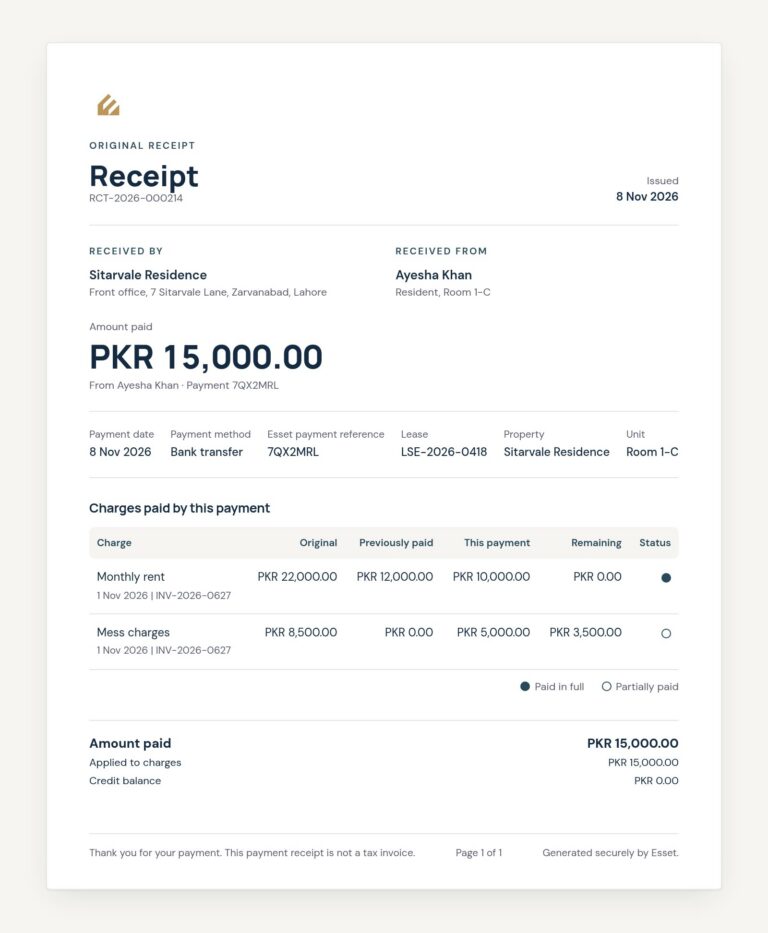
A partial payment example in PKR
This illustrative example shows how a payment report affects a tenant balance. It assumes no other charges, credits or arrears.
| Event | Confirmed payment | Outstanding rent |
|---|---|---|
| Monthly rent charge of PKR 30,000 | PKR 0 | PKR 30,000 |
| Tenant reports a PKR 20,000 transfer and uploads proof | PKR 0 while review is pending | PKR 30,000 |
| Team matches PKR 20,000 against the bank statement and confirms it | PKR 20,000 | PKR 10,000 |
| Team confirms a further PKR 10,000 payment | PKR 30,000 in total | PKR 0 |
During review, identify the reported amount separately. After the first payment is confirmed, any collection message should show the remaining PKR 10,000.
Step 4. Roll out reminders carefully
Reminders should reduce confusion, not create pressure. A predictable sequence works better than ad hoc calls:
- Before the due date: a short, friendly notice with the amount and how to pay.
- On the due date: a reminder for anyone still showing as upcoming.
- After the due date: a measured follow-up for overdue balances, then a personal call.
Agree how your team handles payments under review before enabling reminders. Pause collection messages for the amount being checked, assign a reviewer and review outstanding reports each working day. After confirmation, follow up only on any remaining balance. If a report is rejected, explain the reason and resume the appropriate follow-up. These are operating rules to configure and test with your team. Our guide to tenant communication workflows explains how to keep status updates clear and consistent.
It also helps when tenants can check their own balance. The Esset tenant app lets tenants view balances, receipts and invoices, view lease and billing details, request and track maintenance, and report payments with proof for the team to review (Esset tenant app). Esset sends automated rent reminders before and after the due date by email, SMS, WhatsApp and push notification to the tenant app. Plans also include automatic notifications when payments are recorded (Esset Pricing & Plans).
Step 5. Track arrears and follow-up commitments
An arrears report should show who owes rent, the outstanding amount and how long it has been overdue. Use it to assign follow-up and record payment commitments.
- Age the debt. Group balances into current, 1 to 30 days, 31 to 60 days and over 60 days. Older debt needs a different conversation.
- Record every promise. Note the date and amount a tenant promised, then check it on that date.
- Apply late fees consistently, if your lease allows them. Inconsistent fees cause more disputes than the fee itself.
- Write off deliberately. When an amount is truly uncollectible, record a write-off rather than leaving it to distort every report.
In Esset, an A/R Aging report shows what tenants owe and for how long; it comes with the rent module and is included on the Starter plan (property accounting). Custom fee settings for late fees sit on the Growth plan and write-offs on every plan (Esset Pricing & Plans). Use the current feature comparison to check the features and allowances available for your account.
Step 6: Close the month with an automated rent roll and statements
When the rent cycle is already structured, month end becomes a review instead of a rebuild.
- Rent roll. A rent roll lists every unit, its tenant and its rent, so you can see occupancy and expected income in one view. “Automated rent roll” simply means this list is produced from your lease records rather than retyped. In Esset, A/R Aging, Rent Roll and Collections reports are included on Starter, Growth and Premium (Esset Pricing & Plans); rent roll and vacancy sit in the report library.
- Tenant statements. Each tenant’s charges, payments and balance, ready to send when someone asks “what do I owe?”.
- Owner statements. Collected, pending and overdue rent per owner, plus expenses. This is what “rent statement automation” should mean in practice: the statement comes out of records you already keep.
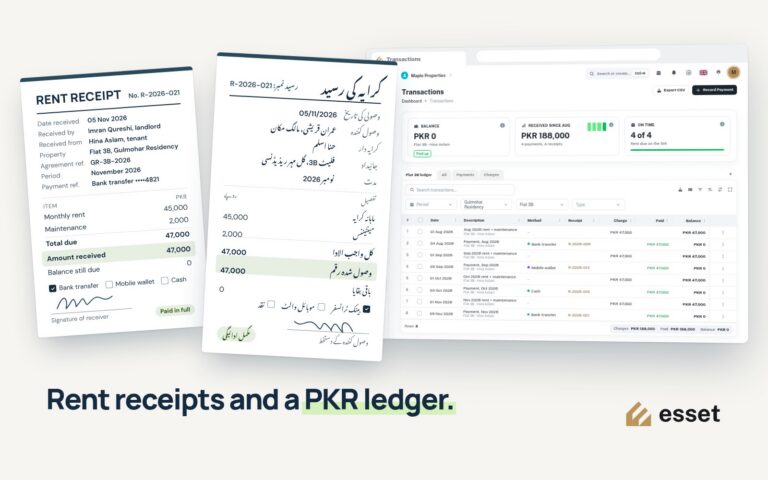
- The ledger behind it. Every payment, charge and expense should be traceable. Esset’s Transactions list is a read-only central ledger that can be filtered and exported as CSV or JSON (how to track transactions).
An example 30/60/90-day rollout timeline
This is a phased planning example for a larger portfolio. Your schedule depends on record quality, the number of tenancies and staff availability. A small property with reconciled records may complete the steps sooner.
| When | Focus | Done when |
|---|---|---|
| Days 1 to 30 | Records and rent cycle | Every active tenancy, rent, due date and opening balance is in, checked, and charges generate on schedule |
| Days 31 to 60 | Payments and proof review | Tenants know how to pay and report proof; the team reviews reported payments on a fixed rhythm |
| Days 61 to 90 | Reminders, arrears, reporting | Reminder sequence agreed, arrears aged weekly, month-end rent roll and owner statements produced from the system |
Start with one property or one building if you manage several. Fix what breaks there, then roll out to the rest.
Measure operations, not only payments
Track a few numbers monthly so you can see whether the rollout is working:
| Metric | What it tells you |
|---|---|
| Collection rate | Share of rent due this month that has been confirmed |
| Overdue balance and age | Whether arrears are shrinking or getting older |
| Days to payment | How long after the due date rent typically arrives |
| Unreviewed reported payments | Whether proof review is keeping up |
| Manual follow-ups | Calls and messages the team still sends by hand |
| Reconciliation exceptions | Payments that did not match a charge first time |
If manual follow-ups remain high, review data quality, payment review delays, reminder settings and tenant onboarding. Compare the results with your starting figures before changing the workflow.
Seamless rent collection for developers and multi-building portfolios
Developers and larger operators who keep rental stock face extra layers: many buildings, sometimes several owning companies, and investors who want reports. Three things make collection feel seamless at that scale:
- Structure before volume. Group properties into portfolios the way you report on them. Esset’s Growth plan adds portfolio, owner and vendor management, team members and custom roles (Esset Pricing & Plans).
- Separate companies stay separate. Esset supports company contexts with their own tenant data, lease records and financial reporting (property management software).
- Connect other systems. If you run your own dashboards or ERP, API access on the Premium plan lets other software work with Esset data (Esset Pricing & Plans).
What to look for in online rent collection software
- Charges generated automatically from the lease
- Tenant self-service: balance, invoices, receipts, payment reporting
- A clear review step between “reported” and “paid”
- Partial payments, late fees, deposits and write-offs
- Arrears aging and a collections view
- Rent roll, tenant statements and owner statements from the same records
- A full transaction ledger you can export
- Roles and permissions for teams
- A free trial so you can test with your own data
How Esset handles online rent collection
Esset keeps rent, balances and lease dates in view for every unit, with charges, recorded payments and the balance in one tenancy record (Esset rent collection and leases). Tenants report payments with proof in the tenant app and your team confirms or rejects each one; the balance changes only after confirmation (payment reports). Owners and team members can also ask a read-only WhatsApp assistant about balances, occupancy or expenses, in English, Urdu or Roman Urdu, within their existing access permissions; it is available on request and usage follows plan limits (WhatsApp assistant). Every plan starts with a 14-day free trial with no credit card required (Esset pricing).
Collecting rent in Pakistan? Esset works in PKR, and tenants can report bank transfer, mobile wallet or cash payments with proof in the tenant app for your team to review (Esset in Pakistan). For portfolios see property management software for Pakistan, and for ledgers and deposits see property accounting software. Two local rules make written records worth the effort: Punjab’s rent law lists the landlord’s bank account details as a rent agreement item when rent is paid through a bank (Punjab Rented Premises Act 2009, section 6), and Sindh’s ordinance says the landlord should acknowledge each rent payment in writing (Sindh Rented Premises Ordinance 1979, section 10). Read more in our guides to rent payment records in Pakistan, the rent agreement format, owner reporting for Pakistan rental portfolios and online rent collection for overseas Pakistani landlords.
FAQ
What is online rent collection software?
It is software that creates rent charges from your leases, lets tenants pay or report payments online, records each payment against the right charge, and shows what is still owed. The useful part is the record, not only the payment method.
What is the difference between online rent collection and rent collection software?
Online rent collection usually means the tenant pays digitally. Rent collection software covers the whole cycle: charges, payments, verification, arrears and reports, whether the money arrived online, by bank transfer or in cash.
Does a tenant’s payment proof mean the rent is paid?
No. Proof is a claim that still needs checking against your bank or wallet. In Esset, the team reviews and confirms or rejects each reported payment, and the balance changes only after confirmation (payment reports).
How do I stop reminders going to tenants who already paid?
Review payment reports before sending collection messages and test your reminder settings. Pause messages for the amount under review, confirm or reject the report promptly, and follow up on any remaining balance. After a rejection, tell the tenant why and resume the relevant follow-up. Confirm the reminder channels and allowances available for your account.
What is an automated rent roll?
A rent roll lists each unit, tenant and rent. It is “automated” when it is generated from your lease records instead of being retyped. In Esset, the Rent Roll report is included on Starter, Growth and Premium (Esset Pricing & Plans).
What should rent arrears software show?
Who owes, how much, and how long the debt has been outstanding, ideally grouped by age, with notes on promises to pay, late fees where the lease allows them, and write-offs. In Esset, the A/R Aging report shows this and is included with the rent module on the Starter plan.
How long does it take to roll out online rent collection?
There is no fixed implementation period. The 30/60/90-day schedule above is an example for a phased portfolio rollout. Set your schedule around record cleanup, tenant onboarding and staff training, then test one complete rent cycle before expanding.
Can I export my data if I stop using the software?
Check before you commit. Esset lets you export reports, lease ledgers and transactions as CSV, and you have 30 days after cancelling to export your data (Esset FAQ).
This article is general operational guidance for landlords, hostel operators and property teams. It is not legal, tax, accounting or financial advice. Review local requirements and speak with a qualified professional before making policy or compliance decisions.

Comments (0)