
Property Management Software for Small Teams: 10-Point Checklist
A 10-point checklist and 14-day trial plan for small property teams comparing rent tracking, leases, maintenance and reporting.
Small property teams need software that can show who has paid, which units are vacant, whose lease is ending and which repairs are waiting. Use this 10-point checklist to compare property management software on a real workflow before you commit.
The checklist is for independent landlords and small teams running long-term rentals across one or more properties, from a handful of units to a few hundred. It works whether you search for property management software, tenant management software or estate management software. For a shortlist of named vendors serving Pakistan, see our property management software comparison for Pakistan.
10-point property management software checklist
Ask each vendor to demonstrate these tasks with the same scenario. Mark each item works, workaround needed or missing, and note which plan includes it.
- Properties and units. Add a building and a separately managed unit. Find every vacancy across your properties in one view.
- Leases and renewals. Create a lease with dates, rent and a deposit. Check who receives the renewal reminder and when.
- Rent and reconciliation. Issue a recurring invoice, record a partial payment and confirm that the balance and receipt agree. If tenants send payment proofs, check how staff verify funds before closing the invoice.
- Tenant records. Open a tenant profile and find their current lease, invoices, payments and documents without searching another system.
- Maintenance. Log a repair, assign someone to handle it, record an update and close it. Check whether the tenant can see the status.
- Expenses. Record a contractor bill against the correct property and check that it appears in that property’s report. Our guide to tracking every expense and vendor bill shows what to capture.
- Reports. Run a rent roll, an overdue balances report and a collections report. Confirm you can filter by property and export the information you need.
- Tenant access. Ask a tenant to find a receipt or submit a repair request. Check what works on the devices your tenants actually use.
- Team permissions. Try a limited staff account. Check who can view documents, record payments, export reports and change lease terms.
- Price and portability. Get the total cost for your unit count, team size and required features. Ask about payment fees, onboarding and what you can export if you leave.
If a tool is missing points 1 to 4, it will not replace your spreadsheet, however good the rest looks. If you are still on spreadsheets, our guide to moving from spreadsheets to property management software covers the switch.
Tenant management software: what connected records mean
Many searches for tenant management software are really asking one thing: can I find everything about this tenant in one place? Connected records mean a tenant profile links to their unit, lease, invoices, payments, documents and maintenance requests. The answer to “what do I owe?” should be one click away, not spread across chats, folders and a sheet.
Tenant self-service removes routine questions, so ask each vendor what tenants can do themselves. One distinction matters: a tenant uploading a payment proof is not the same as the payment being confirmed. Someone on your team should still check that the money arrived before marking rent as paid, so ask how the tool separates proof received from payment confirmed.
For the communication side, see tenant communication workflows that reduce follow-up.
Adjust the checklist for your rental portfolio
One building or scattered sites across several locations
For one building, focus on simple billing, lease reminders and repairs. Many small teams instead run a scattered-site portfolio: flats, houses, shops and rooms in different areas, often for different owners. Check that the software can:
- Group properties your way, for example by owner, area or building.
- Show every unit across all properties in one list, with a filter for vacant units.
- Report by property and by owner, so each owner sees only their numbers.
- Handle mixed unit types, such as flats, rooms and offices, in the same account.
Then confirm that staff and owners see only the records they are meant to access. New to this structure? Read portfolios, properties and units explained.
Monthly serviced apartments or nightly stays
Serviced apartment software covers two different businesses. Monthly furnished or serviced rentals behave like ordinary tenancies: a lease, recurring invoices, deposits, maintenance and a tenant record. Lease-based property management software fits them well. Nightly or weekly stays usually need a booking calendar, rate controls, guest messaging and channel management, which is the job of short-term rental or hospitality software. If you run both, test the handoff between the booking and rent workflows before buying.
Payment methods and reporting by market
Confirm which payment methods and settlement currencies the vendor supports where you operate, who pays transaction fees and how bank transfers are matched to invoices. In Pakistan, for example, test the transfer or wallet workflow your tenants already use. Ask an accountant to confirm that report exports contain the records they need.
Maintenance, expenses and the reports owners ask for
Owners question repairs and bills most. Look for maintenance requests with a status, a priority and a named person on your team, where the tenant can see progress without chasing. Make sure every cost attaches to the right property so owner reports show real net income. Our guide to maintenance and complaint tracking for small property teams sets out a simple process.
You need a few reports you trust, not dozens of dashboards:
- Rent roll: every unit, tenant, rent and lease end date.
- Arrears or AR aging: who owes what, and for how long.
- Collections: what was billed versus collected this month.
- Occupancy: vacant units and leases ending soon. See our guide to lease and occupancy tracking.
- Income and expenses by property: what each owner or building actually earned.
Also test owner visibility: can an owner get a quick answer without logging in? Ask each vendor whether owners can check a figure, for example how much rent is overdue this month, without opening the portal, and whether that channel can only read data or can also change it.
Run a 14-day trial with one property
Use the trial on real work, not demo data, and check each vendor’s trial length before you start.
- Days 1 to 3. Load one property and a representative set of units, opening balances and lease terms. Use sample or redacted data during vendor demos.
- Days 4 to 7. Run a billing rehearsal with one full payment, one partial payment and one overdue invoice. Compare totals to your current records.
- Days 8 to 11. Have your team handle a maintenance request, record a vendor expense and look up a tenant’s payment history.
- Days 12 to 14. Export a rent roll and an arrears report. Ask the people who will use them whether they can finish their usual work without a separate spreadsheet.
For a smaller first migration, see what landlords should track first. If you are introducing online rent collection at the same time, our online rent collection rollout plan helps you phase it in.
Where Esset fits
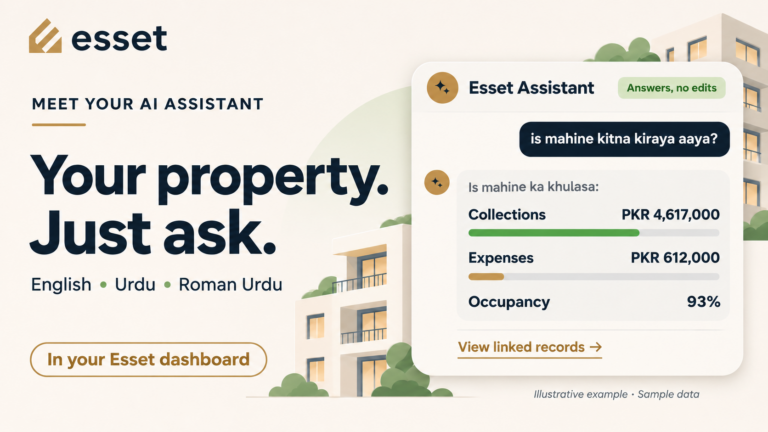
Esset brings leases, tenant records, rent collection and reporting into one place. Tenant profiles hold contact details, identity documents and the leases and units linked to each tenant (how to add and manage tenants). Apartments, hostel rooms and offices are all treated as units, and the Units list shows every unit across your properties with a vacant-only filter (how to add and manage units). Owners can also ask Esset’s WhatsApp assistant business questions in plain language from their own WhatsApp and get answers without opening the portal. The assistant is read-only: it answers questions and does not create or edit records, message tenants or take actions.
In the Esset tenant app, tenants can view their balance, invoices and receipts, request maintenance and track its progress, submit payment proofs, send documents when you ask for them, and view and download their contract. Your team still confirms each payment before it is marked as paid. Online contract signing and renewal for tenants are planned, not live yet.
The entry plan includes lease management, tenant profiles, rent collection, security deposit management, automated invoicing, and AR aging, rent roll and collections reports. The Growth plan adds portfolio management, maintenance requests, expense tracking, owner and vendor management, the full accounting module and role-based access control. Agencies managing for several owners can use multi-company accounts on a custom plan (esset.io FAQ). Esset is built for monthly and longer lets and does not list booking channels or nightly rates.
The international site lists plans from US$29 per month, priced by the number of units, with a 14-day free trial and no credit card required (current plan details). Pakistan pricing is listed separately.
Frequently asked questions
What should a small property team test first?
Start with leases, rent and tenant records. Enter one active lease, issue an invoice and record a partial payment. Make sure the tenant balance, receipt and arrears report agree before evaluating extra features.
What is the difference between tenant management and property management software?
Tenant management covers tenant records, leases, payments and communication. Property management software also typically tracks units, maintenance, expenses, owners and portfolio reporting. Small teams usually need both in one system, so test how these records connect when you switch between tasks.
Is estate management software the same as property management software?
The terms are often used for the same job: running rented property day to day. Check the feature list rather than the label, since some estate management tools focus on large estates or facilities instead of tenants and leases.
Does lease-based software work for serviced apartments?
Yes, for serviced or furnished units let on monthly or longer terms, because each unit gets its own lease, invoicing and tenant record. For nightly bookings and channel management, a dedicated short-term rental platform is the better fit.
Is this checklist useful for small social housing providers?
The checklist applies to any small team managing tenants and repairs. Social housing providers often have extra reporting and compliance duties, so check those requirements directly with each vendor. Esset does not describe social housing specific features on its site.
How do I compare pricing across tools?
Price each tool for the same number of units and staff accounts. Include payment fees, add-ons and onboarding, then calculate what the plan would cost if you added another property. Check which tier includes maintenance and portfolios.
Next step
Shortlist with the checklist, then test one property for 14 days. To see how Esset handles leases, rent collection, tenant records, maintenance and reports, start a free trial on esset.io or read more about Esset.
This article is general operational guidance for landlords and property teams. It is not legal, tax, accounting or financial advice. Review local requirements and speak with a qualified professional before making compliance decisions.

Comments (0)