
Hotel Eye Login and Add Guest Entries, Step by Step
Add a guest once in Esset and Hotel Eye reporting is handled for you. Check-ins, check-outs, and a register of each stay's status, across Pakistan.
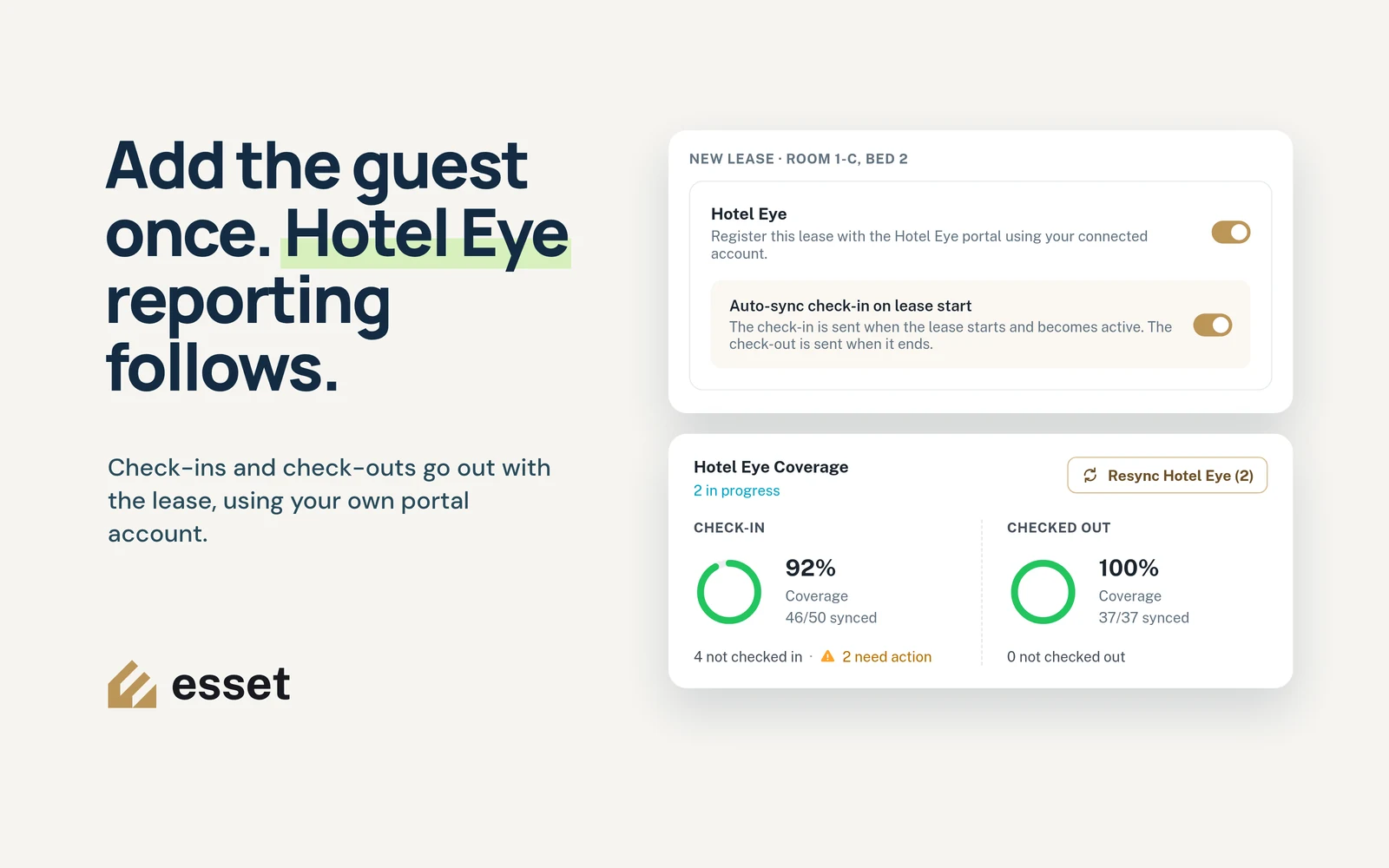
If you run a hotel, hostel or guest house in Pakistan, every guest check-in and check-out has to reach the Hotel Eye portal, or the equivalent police portal, that your property already uses. Done by hand, that means a second login, a long form, and the risk that a late departure is never recorded.
Esset is management software for hotels, hostels and guest houses in Pakistan that treats Hotel Eye reporting as part of the lease. You add the guest once in Esset. Esset reports the check-in and the check-out to the portal. You can see each stay’s status, and you fix anything that is flagged.
Also searched as: hotel eye login, hotel eye portal, mehman registration, police registration hostel, CNIC hotel registration, hotel eye punjab, hotel eye islamabad, ہوٹل ای لاگ ان, مہمان کا اندراج, ہاسٹل پولیس اندراج.
The late-night front desk problem
A guest arrives after midnight, and staff still have to retype the name, father’s name, CNIC, phone, address, room, purpose of visit and the number of children into the police portal. If a later departure is not recorded, that person can stay listed as “staying” for weeks. A typo in a CNIC or a name leads to a rejection, and it is hard to see, from a paper register, whether every guest was reported.
What Hotel Eye is, and who has to use it
Hotels, hostels and guest houses in Pakistan must register every guest with the police. In several parts of the country this is done through a government portal often called Hotel Eye. In Sindh the same kind of system is known as the Hotel Eye Management System (HEMS). Each property keeps its own portal account.
The portal is a government system. Esset is not approved, endorsed, certified or partnered with the Punjab Information Technology Board (PITB), any police force or any government portal. What has to be reported is set by your portal and by local law. Stay compliant without retyping every guest.
Hotel Eye and police registration across Pakistan
Hotel Eye and police registration sync is available across Pakistan. Portals and legal duties differ by area. The sections below describe the local system or reporting duty so you can match this guide to the place you operate. They describe product coverage and public rules, not where Esset customers are located.
Punjab (Hotel Eye)
In Punjab, hotels, hostels and guest houses use the Hotel Eye portal, developed by the Punjab Information Technology Board (PITB) for Punjab Police. The Punjab Home Department has published the portal at hoteleye.punjab.gov.pk, and in May 2025 required guest houses and residential-service providers to register guest data there, including bookings made through online booking sites. Failure to register can be actioned under the Punjab Information of Temporary Residents Act 2015. For hotel eye login Punjab, follow your portal and the Act.
Islamabad Capital Territory
Islamabad Capital Territory Police operate a Hotel Eye digital system for hotels, guest houses and similar stays. Official reporting in November 2025 described the Islamabad police Hotel Eye portal as in use across police stations for guest registration. For hotel eye login Islamabad or ICT police Hotel Eye, use the account issued by local police and follow the portal’s own rules.
Sindh
Sindh Police run the Hotel Eye Management System (HEMS) for hotel check-ins and check-outs, with CNIC and personal details. Under the Sindh Information of Temporary Residents Act 2015, hotels and guest houses must provide check-in details to the relevant police station. A December 2025 news report said hotels, guest houses, musafir khanas and hostels across Sindh are registered with HEMS. For hotel eye login Sindh or hostel guest registration Karachi, use the account your property was given.
Khyber Pakhtunkhwa
Khyber Pakhtunkhwa Police provide a Hotel Eye portal for guest registration. The Khyber Pakhtunkhwa Hotels Restriction (Security) Act 2014 requires hotel owners, lessees or managers to record guest names, addresses, arrival and departure dates, purpose of visit and CNIC, and to intimate guest information to local police daily. For Hotel Eye KP or hotel guest registration Peshawar, follow the Act and your portal’s instructions.
Balochistan
Balochistan Police use a Hotel Eye system for hotel guest check-in logging. Quetta Police list “Hotel & Travel Eye” among their smart applications. Record-keeping is also required under the Balochistan Restrictions of Rented Buildings (Security) Act 2015. In April 2026 a provincial official said administrators of hostels, hotels and other rented accommodation must keep guest records, and that guests staying more than 24 hours must be reported to the local police station.
Gilgit-Baltistan
Gilgit-Baltistan Police operate a Hotel Eye system under the Gilgit-Baltistan Police Automation Project. The official GB Police page says hotels record guests’ ID-card data and personal details in Hotel Eye when a domestic or foreign tourist stays. For hotel eye login GB, hotel guest registration Gilgit, or hotel guest registration Hunza, use the account issued for your property.
Azad Jammu and Kashmir
AJK has a legal duty to report hotel and hostel guests to the police, but this guide does not treat a dedicated AJK Hotel Eye portal as confirmed. Under the Azad Jammu and Kashmir Rented Premises/Buildings (Inspection and Security) Act 2016, the owner or manager must provide guest information to the police in the prescribed manner. Follow the Act and local police instructions. A Neelum Valley “Safe Tourism” app launched in January 2025 is a district tourism-and-safety tool, not a confirmed AJK-wide Hotel Eye portal.
How Esset reports check-ins and check-outs
In Esset, a guest’s stay is a lease on a room or bed. Hotel Eye enrolment is per lease, not per tenant. When the stay starts and the lease becomes active, Esset reports the check-in to the portal. When the stay ends, Esset reports the check-out. A lease created today for next week is reported when the guest arrives and the stay becomes active.
If several guests share one room or lease, they are all registered together.
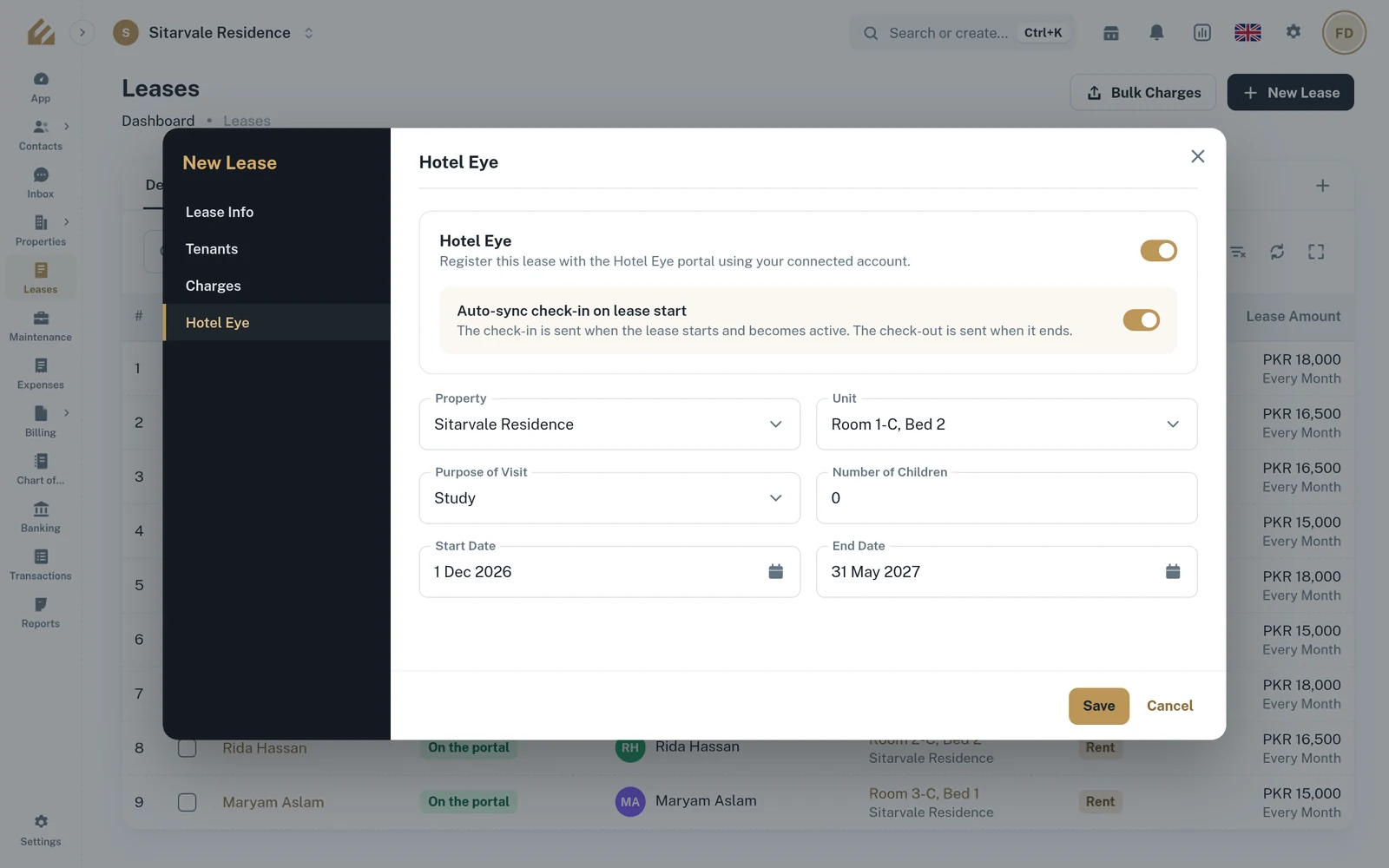
On a new lease, the “Hotel Eye” section has a switch that registers the lease with the portal. The switch is off by default, and it is shown when your company has Hotel Eye enabled. Once that switch is on, “Auto-sync check-in on lease start” appears, and it is on by default. On an existing lease, the “Enable Hotel Eye” button opens a dialog with the same auto-sync switch, also on by default.
Guest details the portal needs
The lease shows which guest details are needed. If a required detail is missing, the stay is flagged until you fix it.
| Field |
|---|
| Guest name |
| Father’s name |
| ID / Passport No. |
| Gender |
| Phone (main guest) |
| Address (main guest) |
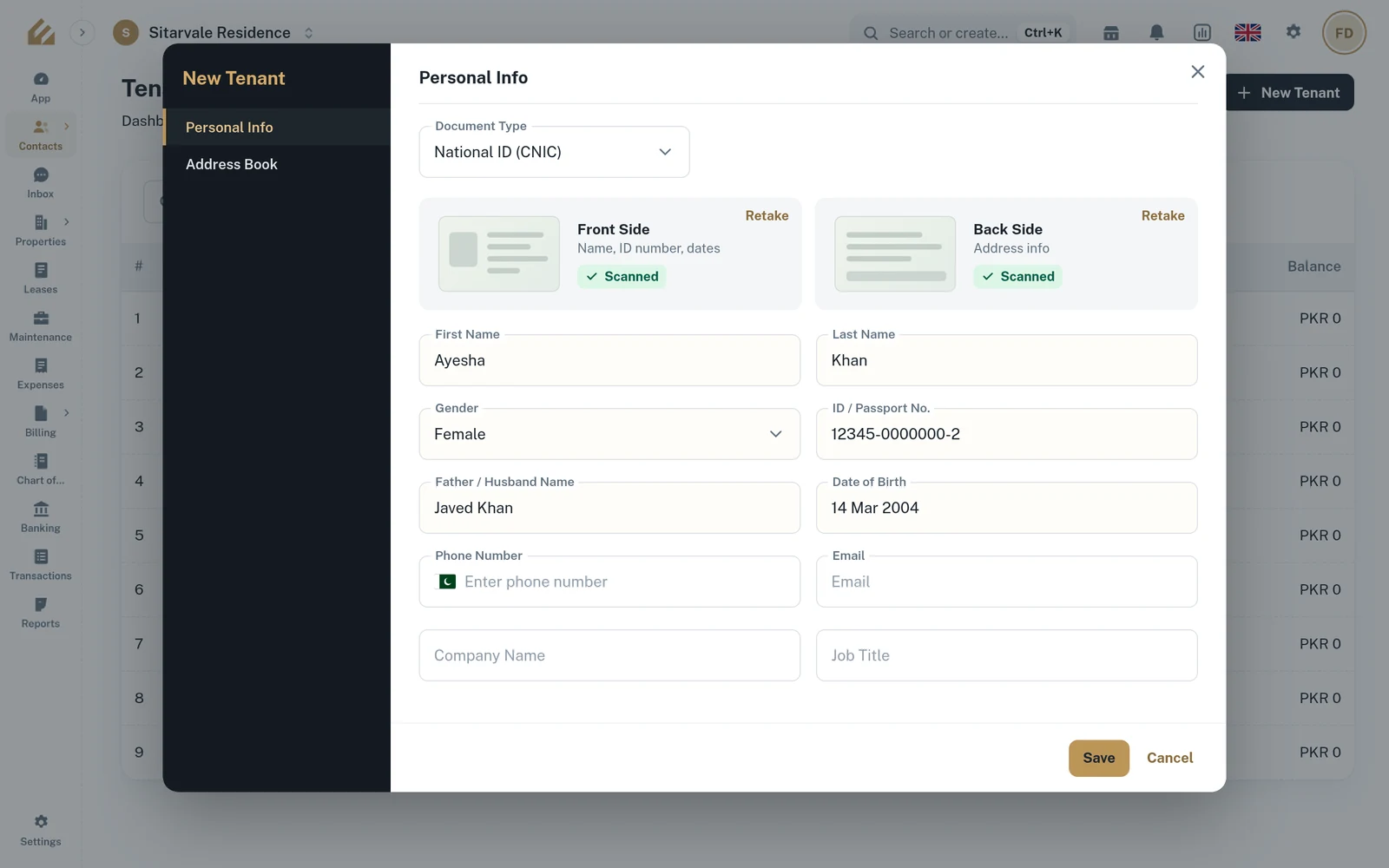
You can enter these fields by hand. If the CNIC scan option is enabled, go to the tenant form’s Personal Info tab, choose Document Type “National ID (CNIC)”, upload the “Front Side” and “Back Side” photos, and review the pre-filled fields, including “ID / Passport No.”. If the scan fails, retake the photo in good light or enter the details manually. The scan is an option that may need to be enabled.
If a stay is flagged
If something is flagged, open the lease, read the reason, fix the guest details, and use “Retry now”.
The compliance register and CSV export
The compliance register lists every stay and its Hotel Eye status.
| Status shown | What it means |
|---|---|
| Check-in and check-out missing | neither was reported |
| Check-in missing | the stay has not been reported as a check-in |
| Check-out missing | the check-out has not been reported |
| Needs attention | something needs a person to review it |
| Sending | in progress |
| On the portal | the stay has been reported |
| Not sent | not due yet |
Green is fine, red is missing, amber needs attention, and grey is not due or in progress. The register can be filtered, sorted and exported to CSV.
How to connect your Hotel Eye account
- Create your Esset account, or open Hotel Eye settings, as directed on esset.io.
- Connect your Hotel Eye account in Settings > Platform > Hotel Eye.
- Make sure guest details are filled in. Enter them by hand, or use the CNIC scan option described above if it is enabled.
- Create the lease as usual. Purpose of visit and number of children go on the lease. Then turn on Hotel Eye enrolment as described above, with the “Hotel Eye” switch or the “Enable Hotel Eye” button.
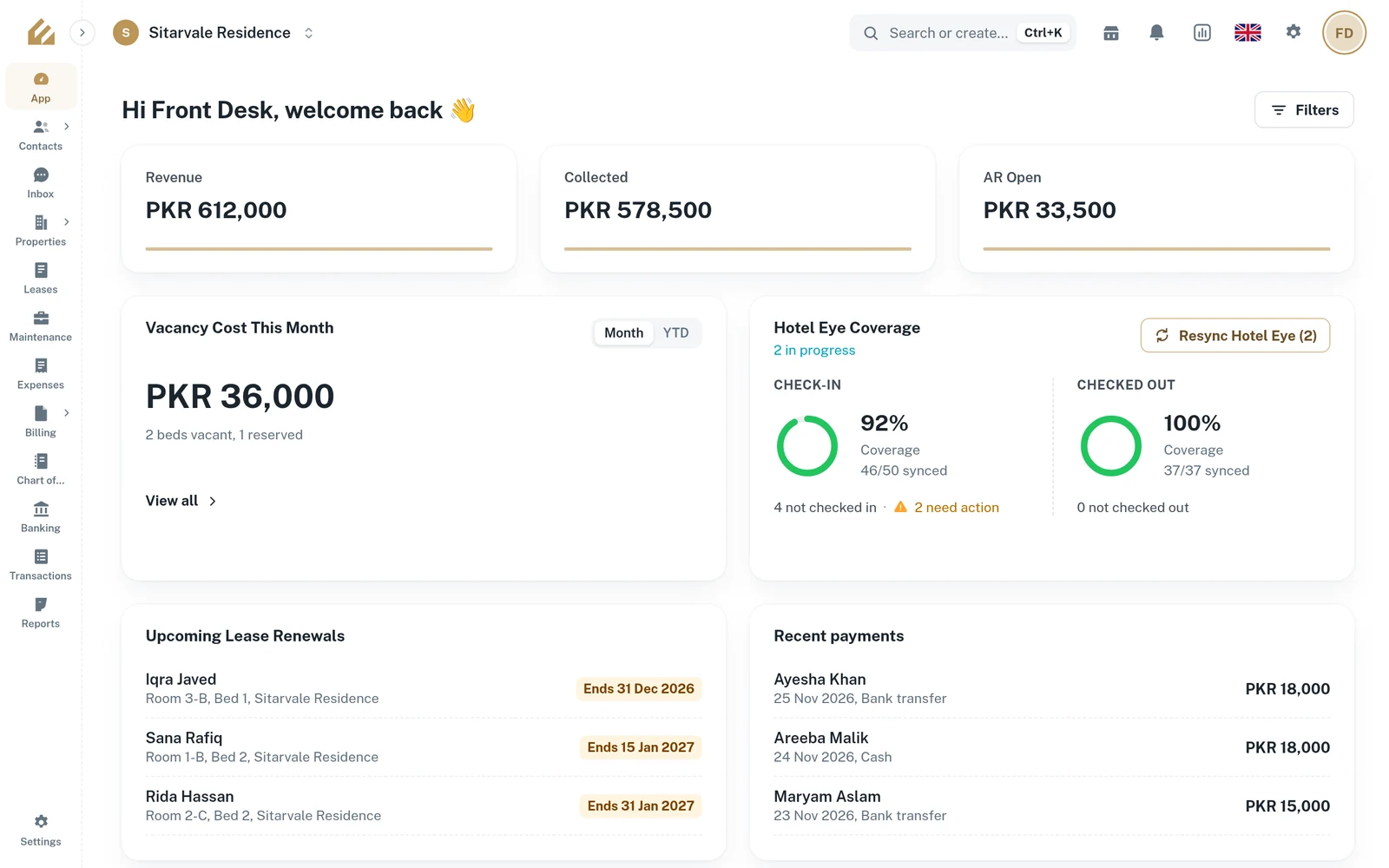
- After that: Esset reports the check-in when the stay starts and the check-out when it ends. Watch the lease status, the compliance register, or the “Hotel Eye Coverage” widget.
FAQ
Do I still need my own portal account?
Yes, your property keeps its own portal account.
What about foreign guests?
Phone numbers from any country are accepted. Foreign guests can be registered with their passport details, in the “ID / Passport No.” field.
Does this work outside Punjab?
Hotel Eye and police registration sync is available across Pakistan.
How quickly is a guest reported?
Usually within minutes of the stay starting or ending, as long as the details are filled in and the portal is up.
Can I see proof for an inspection?
Yes. The compliance register and the CSV export show each stay’s status.
How do I log in to Hotel Eye?
Log in to your province or territory’s police guest-registration portal with the account issued when your property was registered with local police. With Esset, you add the guest once, and Esset reports the check-in and the check-out to the portal.
Create your Esset account
To connect Hotel Eye reporting to your leases, create your Esset account.
Comments (0)